
It is late, your assignment is due in the morning, and RStudio has just shown a red error message that means nothing to you. Your code looks exactly like the example from class, yet it refuses to run. If that sounds familiar, you are not bad at this. RStudio is simply hard to start with, and most guides skip the parts that actually go wrong.
Students usually struggle with RStudio for three real reasons. First, the setup breaks, because R and RStudio are two separate downloads, and the wrong version, a missing tool or a locked university computer can stop everything before you type a single line. Second, tiny mistakes with spelling, capital letters and file locations create confusing error messages. Third, you are expected to run statistics and write a report at the same time, with no clear order to follow. This guide fixes all three step by step, and if you would rather have someone sit with you while you work, a live RStudio tutor can go through your own assignment with you.
What RStudio Is and Which Version You Should Use
R and RStudio Are Not the Same Thing
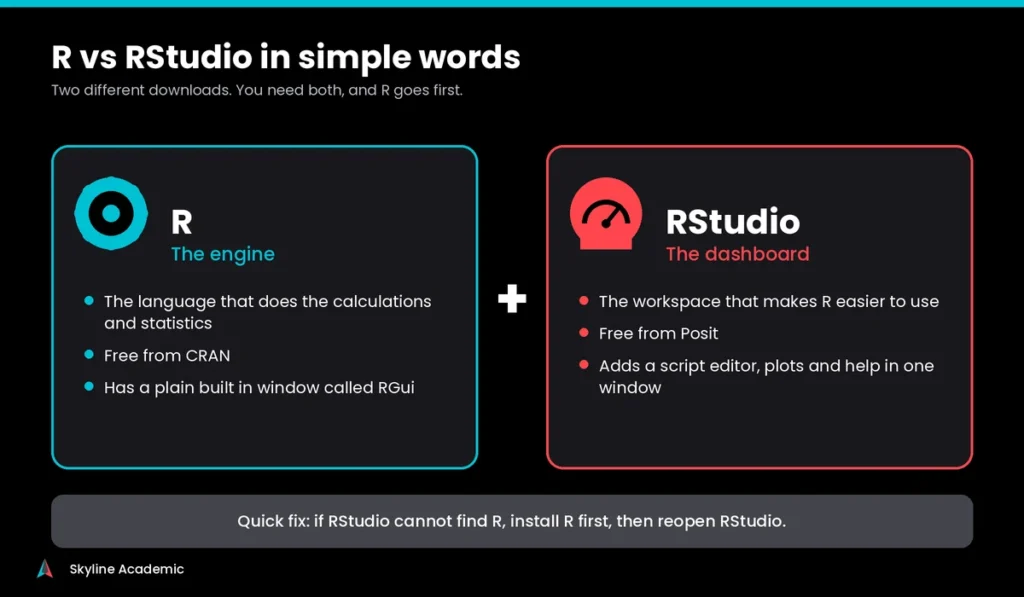
R is the programming language that does the calculations. RStudio is the workspace that makes R easier to use. Think of R as the engine and RStudio as the dashboard. You need both, and you install R first. Plain R does come with a basic window called RGui, but RStudio puts your script, results, graphs and help pages on one screen, which is why most courses teach it
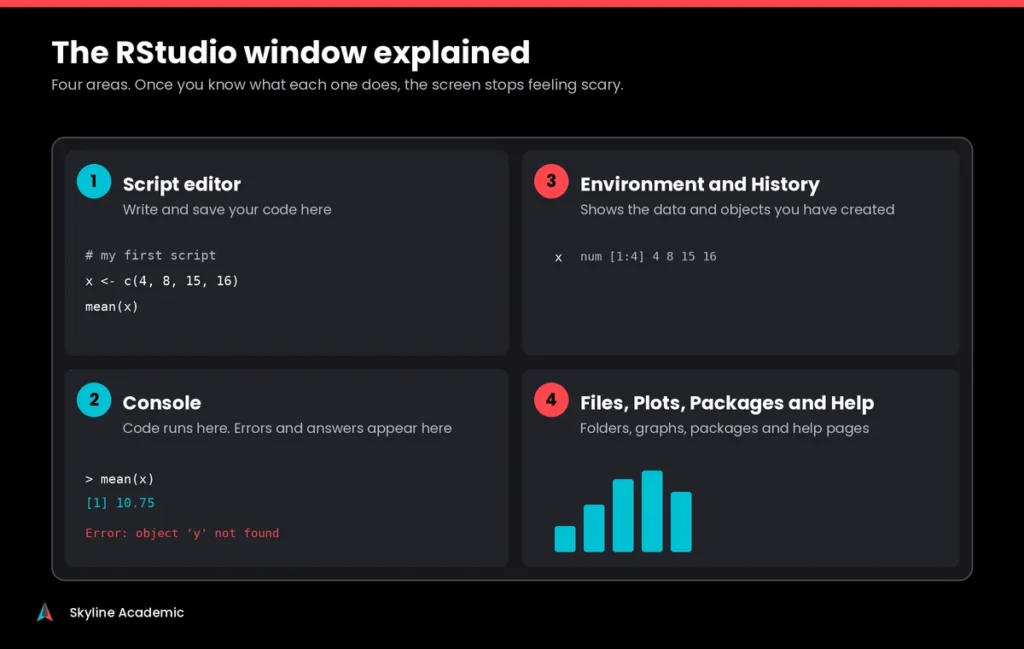
The RStudio window has four main areas: a script editor where you write and save code, a console where code runs and errors appear, an environment area that lists your data, and a panel for files, plots, packages and help. Posit, the company behind RStudio, says millions of people use it every week, and The R Journal reports around 24,000 active packages on CRAN as of mid 2026. That is why so many courses in statistics, health, business and social science rely on it.
Desktop, Cloud or University Server: Which One Should You Use?
There are three ways to run RStudio. The table below shows which one suits which situation.
| Option | Best for | Cost | Watch out for |
| RStudio Desktop | Your own laptop or PC | Free open source edition | You must install R first, and the newest release needs a recent Windows or macOS |
| Posit Cloud | Old laptops, tablets and quick tests | Free plan available | The free plan has monthly hour, memory and run time limits |
| University RStudio Server | Courses that give you a login | Usually free through your school | Your school controls the version and the settings |
Posit Cloud, which used to be called RStudio Cloud, is handy if your laptop is old or you work on a tablet. Just know that the free plan gives you 25 hours a month, 1 GB of memory and a one hour limit per run, so large datasets can struggle.
Is RStudio Free, and What Is R-Studio Recovery Software?
Yes, RStudio Desktop is free. The open source edition uses the AGPL license, which is fine for coursework, and the paid versions are made for companies. One warning: searching for RStudio sometimes shows R-Studio, a data recovery program that has nothing to do with statistics. If a website asks you to pay for RStudio to do your homework, close it and download from posit.co instead.
Installation and Setup Problems Students Run Into
The Right Order to Install R and RStudio
Most setup errors come from doing things in the wrong order. Follow these steps.
- Download R from CRAN, choose your operating system and finish the installer.
- Download RStudio Desktop from Posit and install it.
- Open RStudio, click in the Console, type 2 + 2 and press Enter. If you see 4, everything is working.
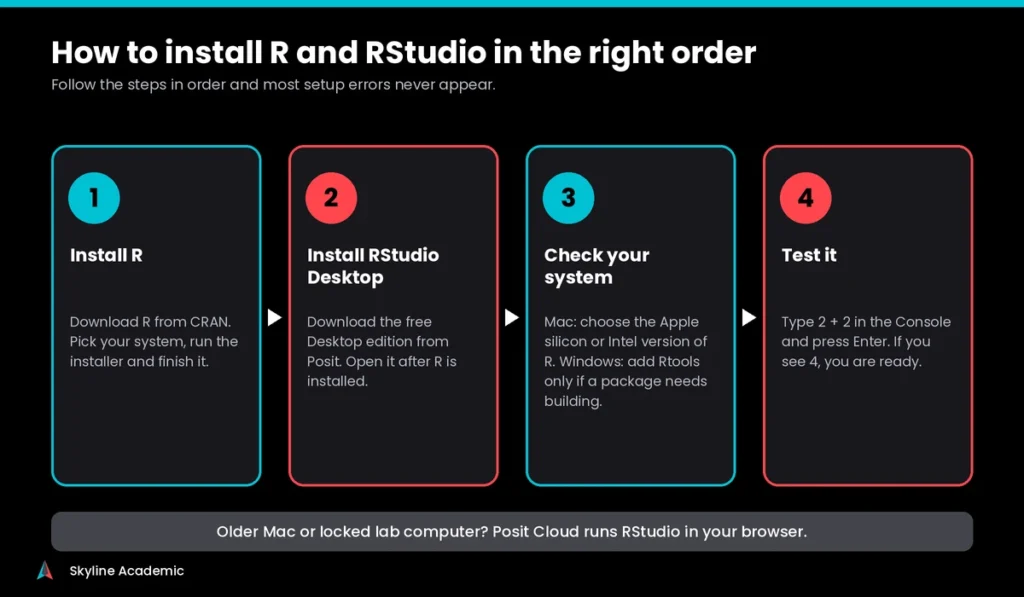
If you installed RStudio first, nothing is broken. RStudio just cannot find R yet. Install R, then reopen RStudio.
Mac Problems: Apple Chips and Older macOS
On a Mac, the first question is which chip you have. Click the Apple menu, then About This Mac. CRAN offers separate R installers for Apple silicon Macs (M1, M2, M3 and newer) and for Intel Macs. Picking the wrong one is a common cause of slow performance and package problems. The current RStudio release also lists macOS 14 or newer for its downloads, so an older Mac may need an older RStudio version or Posit Cloud instead.
Windows Problems: Rtools and Locked Lab Computers
On Windows, most packages install as ready to use files. Some have to be built on your computer, and that is when you see a long red message about a compiler. This is where Rtools comes in. CRAN explains that Rtools is only needed for packages with C, C++ or Fortran code, and that R 4.5 and later uses Rtools45. On a university lab computer you may not be allowed to install anything at all. In that case, ask your IT team, or use Posit Cloud or the RStudio Server your course provides. Also keep your project folders in a short, simple location, because odd file paths cause many of the import errors covered below.
How to Update R and RStudio Without Breaking Your Work
R and RStudio update separately. To update RStudio, open the Help menu and choose Check for Updates. To update R, install the newest version from CRAN, then reopen RStudio. If RStudio keeps using the old one, go to Tools, Global Options, General and pick the R version. To see which version you are running, type R.version.string in the console.
When you move to a new main version of R, for example from 4.5 to 4.6, you usually have to reinstall your packages, so keep a list of the ones you use. And please do not update the night before a deadline.
Common RStudio Errors and How to Fix Them
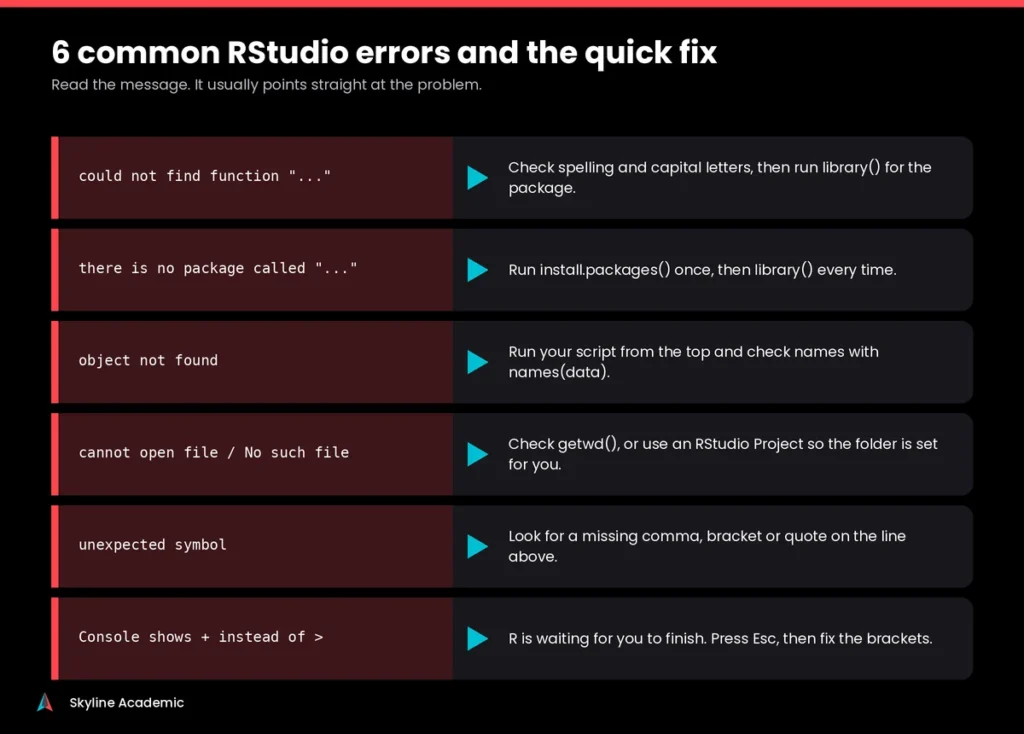
The same handful of errors cause most of the panic. Here is a quick cheat sheet, followed by a closer look at the ones students ask about most.
| Error message | What it usually means | First thing to try |
| could not find function | A typing mistake, a wrong capital letter, or the package is not loaded | Check spelling, then run library() for the package |
| there is no package called | The package is not installed yet | Run install.packages() once, then library() |
| object not found | The name was never created, or it is spelled differently | Run your script from the top and check names(data) |
| cannot open file or no such file | R is looking in the wrong folder | Check getwd() or use an RStudio Project |
| unexpected symbol | A missing comma, bracket or quote | Look at the line above the error |
| A plus sign in the console | R is waiting for you to finish a command | Press Esc, then fix the brackets |
Package Errors and Why They Keep Happening
Installing a package and loading a package are two different jobs. You install once with install.packages(“tidyverse”), then you load it in every new session with library(tidyverse). Students often forget the second part, and that is what triggers could not find function. If an install stops with a red message, read the last few lines. On Windows the cause is often the missing Rtools tool described earlier, and on any system a weak internet connection can interrupt a large package such as tidyverse. Try again on a stable connection.
File and Working Directory Errors
When R says it cannot open a file, it is looking in the wrong folder. Type getwd() to see where R is looking. You can change it from the Session menu by choosing Set Working Directory, but a better habit is to create an RStudio Project from the File menu. A Project sets the folder for you every time you open it. Keep your data file in that same folder and import it with read.csv(“yourfile.csv”). If you prefer clicking, the Import Dataset button in the Environment area does the same job.
Knit Errors in R Markdown and Quarto
Knitting turns your code and notes into a report. It runs your document from scratch in a clean session, so an object that exists in your Environment but is not created inside the document will cause an object not found error. Run each code chunk from the top before you knit, install any missing packages first, and fix the first error message you see, because later ones are often side effects. If a PDF will not knit, LaTeX is often missing. Choose Word or HTML instead, which do not need it.
Clearing the Console and Starting Fresh
If your session gets messy, press Ctrl and L to clear the console, and click the broom icon in the Environment area to clear your objects. If the console shows a plus sign instead of the greater than sign, R is waiting for you to finish a command, so press Esc.
Many students now paste error messages into an AI chat tool. The 2025 Stack Overflow survey found that 44% of developers use AI tools to learn to code, up from 37% the year before. That can save time, but a pasted fix you do not understand usually creates the next error. Read the message first, and check your course rules on AI use.
Doing Real Assignments in RStudio
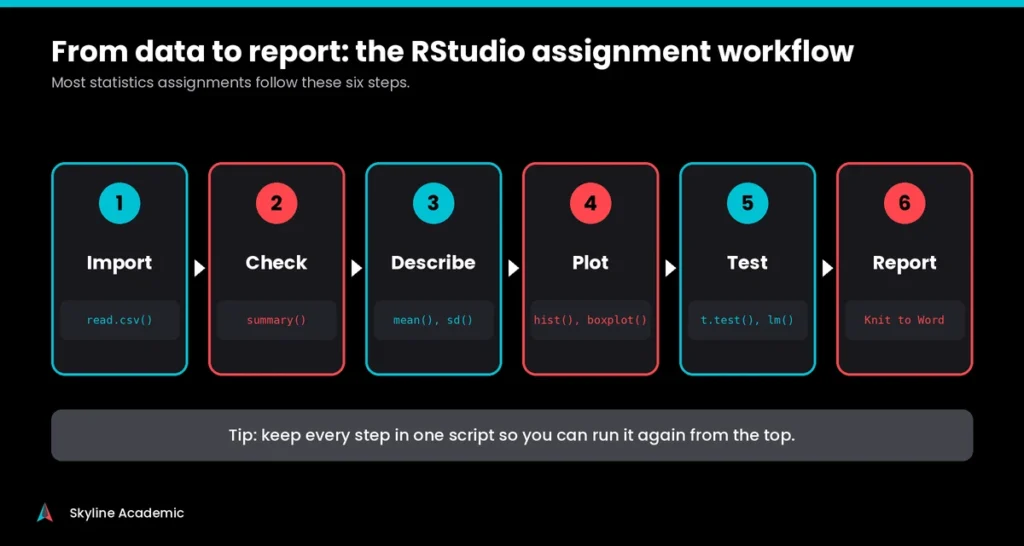
Once RStudio runs, the next struggle is knowing which command to use. The good news is that most assignments repeat the same few moves: import the data, check it, describe it, plot it, test it and write it up.
Common Statistics Tasks
Replace data and score with your own dataset and column names in the lines below.
mean(data$score)
sd(data$score)
t.test(score ~ group, data = data)
model <- lm(score ~ hours, data = data)
summary(model)
The first two give the average and the standard deviation. The third compares two groups with a t test. The last two build a simple linear regression and show the results. If sd() returns NA, your column has missing values, so use sd(data$score, na.rm = TRUE) to ignore them.
Graphs That Are Good Enough to Submit
For a histogram use hist(data$score). For a boxplot use boxplot(score ~ group, data = data). For a scatter plot use plot(data$hours, data$score). Pie charts are possible with pie(), but most instructors prefer bar charts because they are easier to read. Base R graphs are quick, while the ggplot2 package makes cleaner ones, and many courses ask for it. To change colors, add col = “steelblue” to a plot. R has more than 650 named colors, and typing colors() lists them.
Simulation Assignments
Some business and engineering courses ask you to simulate a clinic, a queue or a factory line. R can run basic simulations with code, but if your course expects drag and drop process models, you may be using something like witness simulation software instead. Knowing which kind of task you have saves hours of learning the wrong tool.
Turning Results Into a Report
Most courses want a report, not just code. In RStudio, create an R Markdown or Quarto document, write your notes in plain text and put your code in chunks. Then use the Knit button and choose Word, which is the easiest format to edit and submit. Cite your software properly too. Run RStudio.Version() and RStudio shows its official citation, and typing citation() gives you the one for R.
Small Settings That Make Life Easier
Go to Tools, Global Options, Appearance to change the theme or switch to dark mode. Under Code, then Saving, you can turn on autosave so a crash does not cost you your work. RStudio also works with Git and GitHub, and it can run Python through the reticulate package. If you use an AI coding helper, check your university rules first, because unapproved AI help can count as misconduct at many schools.
RStudio vs SPSS, Stata, NVivo and Other Tools
How RStudio Compares With Other Software
Many students ask whether they should learn R at all when their department also uses SPSS. Our spss software guide for students covers the point and click side in detail. In short, SPSS feels easier on day one because you use menus, while RStudio takes longer to learn but is free and lets you repeat an analysis just by running your script again.
| Tool | Best for | Learning curve | Cost for students | Typical use |
| RStudio | Statistics, graphs and reproducible reports | Steep at first | Free | Statistics, data science and research methods |
| SPSS | Survey data and standard tests | Gentle, menu based | Paid, often through a school license | Psychology, social science and business |
| Stata | Large datasets and panel data | Medium, short commands | Paid, check your school license | Economics and public health |
| NVivo | Interviews, open text and documents | Medium, visual | Paid, often through a school license | Qualitative research |
| Python | General coding and machine learning | Medium to steep | Free | Data science and computing |
| Witness | Queues and process simulation | Medium, visual | Paid, check your school license | Operations and engineering |
Which Tool Fits Which Course
Economics and public health students often meet Stata, which uses short typed commands and is popular for large datasets. If that is you, our stata software for students guide is the better starting point. Python is another free option, and Posit also makes a newer editor called Positron for both R and Python. If your syllabus says RStudio, though, stay with RStudio.
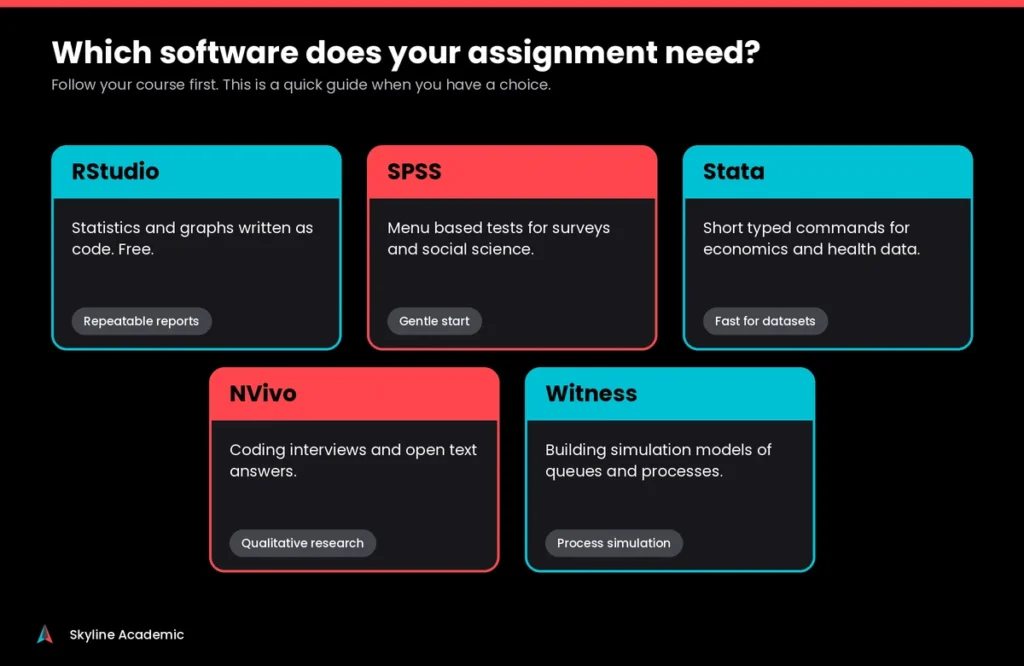
A quick way to choose is by the kind of data you have. Numbers from a survey or an experiment point to RStudio, SPSS or Stata. Events that happen over time in a process, such as customers waiting in a line, point to simulation software. Once you know your data type, the choice gets much easier.
The simplest rule is to follow your course first. If the module says R, learn R. If you have a free choice, pick the tool your instructor and classmates use, because that is where help is easiest to find.
RStudio is built for numbers. If your project is based on interviews, open survey answers or documents, you need a tool made for coding text. Our nvivo guide for students explains how that works.
A Simple 7 Day Plan to Get Comfortable With RStudio
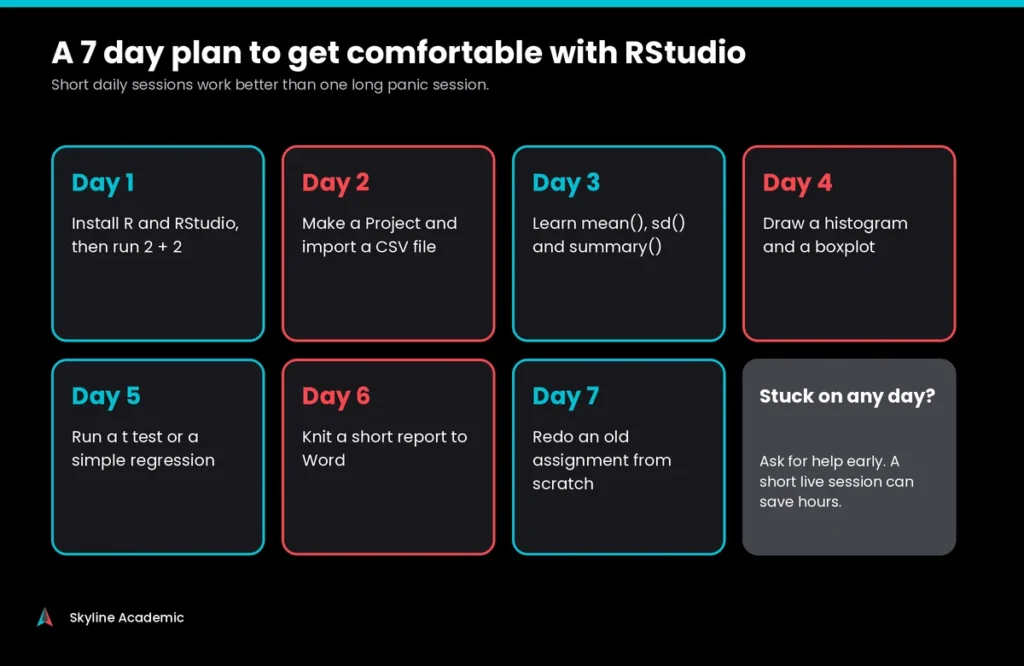
You do not need to learn everything at once, and short daily sessions work better than one long panic session. On day one, install R and RStudio and run 2 + 2. On day two, make a Project and import a CSV file. On day three, practice mean(), sd() and summary(). On day four, draw a histogram and a boxplot. On day five, run a t test or a simple regression. On day six, knit a short report to Word. On day seven, redo an old assignment from scratch.
Keep a small notes file of every error you hit and how you fixed it, because most students meet the same ones again. For free practice material, the book R for Data Science is available online at no cost.
Still Confused and Need Help?
Reading a guide only gets you so far. Sometimes you need someone to look at your screen, your data and your error, and explain what is happening in plain words. That is why students use Skyline Academic as their all in one hub for academic support. Here is what you get.
- 1:1 personalized live tutoring with a tutor who works through your own RStudio assignment step by step
- An interactive LMS dashboard with workshops, bootcamps, student progress tracking and assignment quizzes
- An AI detection tool to review your writing before you submit
- A plagiarism checker to keep your work original
Have an error message you cannot get past? Book a session and bring it with you. Fixing it together is usually faster than another hour of searching alone, and you will understand the fix well enough to repeat it next time. We always encourage students to follow their school academic integrity rules.
Frequently Asked Questions About RStudio
Is RStudio free for students to use for coursework?
Yes. RStudio Desktop has a free open source edition that you can download and use for coursework without paying anything. Paid versions exist, but they are made for companies. Just make sure you download it from the official Posit website.
What is the difference between R and RStudio in simple words?
R is the language that does the calculations, and RStudio is the workspace you use to write and run R code. You install R first and RStudio second. RStudio cannot do statistics without R.
How do I install R and RStudio on a Mac with an M1 or M2 chip?
Download the Apple silicon version of R from CRAN and install it, then install RStudio Desktop from Posit. Choosing the Intel version by mistake can slow R down. Test it by typing 2 + 2 in the Console.
How do I update R in RStudio without losing my packages?
RStudio does not update R for you. Install the newest R from CRAN, reopen RStudio and choose the version under Tools, Global Options, General. A jump to a new main version, like 4.5 to 4.6, usually means reinstalling your packages, so save a list first.
Why does RStudio say there is no package called tidyverse?
It means the package is not installed for that version of R. Run install.packages(“tidyverse”) once and wait for it to finish, then run library(tidyverse). If the install fails on Windows, check whether you need Rtools.
How do I set the working directory in RStudio so my file opens?
Go to Session, Set Working Directory, Choose Directory, or use setwd() with your folder path. An easier habit is to create an RStudio Project and keep your data file inside it. Type getwd() if you are unsure where R is looking.
How do I find standard deviation in RStudio for my statistics assignment?
Use sd(data$score), replacing data and score with your own names. If you get NA back, your column has missing values, so use sd(data$score, na.rm = TRUE) instead.
How do I knit to Word in RStudio for my assignment?
In an R Markdown document, click the arrow beside the Knit button and choose Knit to Word. In Quarto, add format: docx at the top of the file and click Render. If it fails, run your code chunks one by one and fix the first error.
How do I cite RStudio and R in my university paper?
Type RStudio.Version() in the Console to see the official RStudio citation, and type citation() to get the one for R. Copy them into your reference list in the style your course uses, such as APA or Harvard.
How do I change RStudio to dark mode to reduce eye strain?
Go to Tools, Global Options, Appearance and pick a dark editor theme such as Tomorrow Night or Cobalt. The change applies straight away, so you can try a few themes until one feels comfortable.
Final Thoughts
RStudio feels hard at the start because so many small things can go wrong: the install order, a missing package, a wrong folder, a typing slip. The good news is that these problems repeat, and once you know the fixes they stop being scary. Install R first, keep your work in an RStudio Project, read error messages slowly and practice a little each day. If you get stuck, ask for help early instead of losing a whole evening. Skyline Academic is here to help you learn RStudio properly, so the next red error message becomes a small bump instead of a big problem.